
Close Menu
H24 NewsH24 News

    Subscribe to Updates

    Get the latest creative news from FooBar about art, design and business.

    What's Hot

    Jimmy Carter’s family farm to be preserved and opened to the public

    November 10, 2026

    These Xiaomi Phones Are No Longer Getting Support With The Latest HyperOS 4 Update

    November 10, 2026

    8 Best Hotel Mattress Picks for a Five-Star Staycation (2026)

    November 10, 2026
    Facebook X (Twitter) Instagram
    Trending
    • Jimmy Carter’s family farm to be preserved and opened to the public
    • These Xiaomi Phones Are No Longer Getting Support With The Latest HyperOS 4 Update
    • 8 Best Hotel Mattress Picks for a Five-Star Staycation (2026)
    • Gift Guide #2: Your Tough-as-Boots Sister Who Runs Marathons and Takes Care of Everyone Around Her.
    • Sony PlayStation 5 Pro (2026): Here’s How To Purchase Console Online
    • America’s Oldest Active Turnpike Will Pull Down All Its Toll Booths In 2027
    • 2026 Midterms: Blue wave or anti-establishment backlash? | US Midterm Elections 2026
    • Google Fi adds support for a second 5G network, won’t say which one
    H24 NewsH24 News
    Subscribe
    • Home
    • Top News
    • Technology
    • Entertainment
    • Lifestyle
    • Home & Living
    • Auto
    H24 NewsH24 News
    Home»Technology»Gmail Users Should Know About This Little-Noticed Feature
    Technology

    Gmail Users Should Know About This Little-Noticed Feature

    h24By h24November 9, 2026No Comments3 Mins Read
    Facebook Twitter Pinterest LinkedIn Tumblr Email
    Gmail Users Should Know About This Little-Noticed Feature
    Share
    Facebook Twitter LinkedIn Pinterest Email

    You can unsend messages on Gmail, but you only have seconds to act.
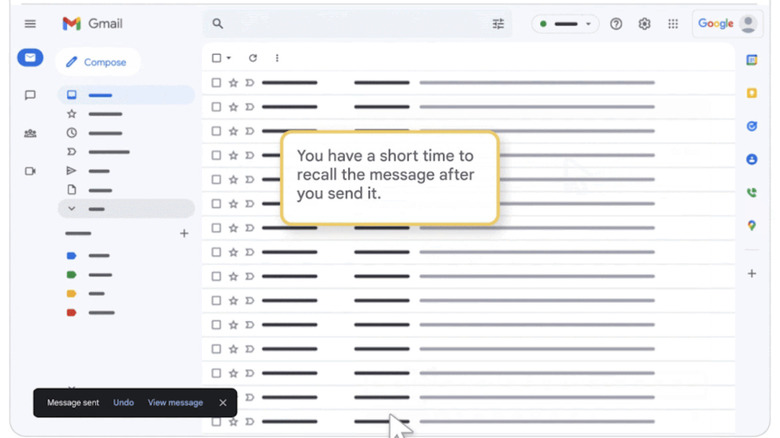

    Gmail unsend feature.
    Google

    Whenever you hit Send on Gmail, a small box pops up in the bottom left corner of your screen that will let you undo the action before it’s too late. It says Message sent along with the options Undo and View message. If you’ve suddenly spotted a typo or remembered a piece of information that you forgot to include in your original message, the “unsend” feature could be your best of friend. However, it only shows up for a very short of amount of time, and you have to hit Undo very, very quickly. 

    To be clear, the feature doesn’t literally “unsend” an email that has already been sent. Once it’s out there, you can’t claw it back from your recipient’s inbox, even if it hasn’t been opened yet. What it does is delay the service from dispatching your email to give you the chance to stop it from going through. That is why you’re only given a short amount of time to decide. Since it only delays your email from being sent, your intended recipient doesn’t get notified about it and will not know that you’ve unsent an email. Take note that hitting View message before the waiting time ends also means you’re ending your chance early to unsend your email.

    How to extend Gmail’s unsend message feature.

    The good news is that you can lengthen the amount of time you have to hit Undo, so you can give your messages a quick final read before Gmail pushes them through. You’ll have to manage your expectations, though: Even if you choose the longest amount of time available, it’s still pretty short. And no, you still can’t take back emails that have already landed in your recipient’s inbox. 

    To choose and extend the amount of time you have to unsend a message, go to Gmail on desktop and click or tap on the Gear icon at the top right corner of the screen. In the Quick settings panel, choose See all settings. In the General settings page, scroll down until you see the Undo Send section, where you’ll find the option to change your cancellation period. 

    It will be set to the feature’s default of five seconds, but you can change it to 10, 20 or 30 seconds. That half-a-minute period is the longest you can delay your email’s dispatch, but it could be long enough to prevent disaster when sending out especially important messages. Don’t forget to hit Save changes at the bottom of the General settings page for the new cancellation period to take effect. 

    Feature Gmail LittleNoticed Users
    Share. Facebook Twitter Pinterest LinkedIn Tumblr Email
    h24
    • Website

    Related Posts

    These Xiaomi Phones Are No Longer Getting Support With The Latest HyperOS 4 Update

    November 10, 2026

    Google Fi adds support for a second 5G network, won’t say which one

    November 10, 2026

    Ancient Egyptian Cat Mummies Reveal Cats Lived Hard Lives

    November 10, 2026

    Comments are closed.

    Demo
    Top Posts

    U2’s ‘Carnaval de Luz’ Album: Review

    November 8, 20263 Views

    Victorian Architecture Meets Mediterranean Charm in This Warm and Whimsical London Home

    November 7, 20263 Views

    Jensen Huang Admits Affair with Suspected Chinese Spy

    November 9, 20262 Views
    Stay In Touch
    • Facebook
    • YouTube
    • TikTok
    • WhatsApp
    • Twitter
    • Instagram
    Latest Reviews

    Subscribe to Updates

    Get the latest tech news from FooBar about tech, design and biz.

    Demo
    Most Popular

    U2’s ‘Carnaval de Luz’ Album: Review

    November 8, 20263 Views

    Victorian Architecture Meets Mediterranean Charm in This Warm and Whimsical London Home

    November 7, 20263 Views

    Jensen Huang Admits Affair with Suspected Chinese Spy

    November 9, 20262 Views
    Our Picks

    Jimmy Carter’s family farm to be preserved and opened to the public

    November 10, 2026

    These Xiaomi Phones Are No Longer Getting Support With The Latest HyperOS 4 Update

    November 10, 2026

    8 Best Hotel Mattress Picks for a Five-Star Staycation (2026)

    November 10, 2026

    Subscribe to Updates

    Get the latest creative news from FooBar about art, design and business.

    • About Us
    • Terms and Conditions
    • Privacy Policy
    • Disclaimer
    © 2026 H24. Designed by Webpointt.

    Type above and press Enter to search. Press Esc to cancel.